The Complete Guide to Core Web Vitals in 2026: Master Google’s Ultimate Ranking Factors

If you want to win in SEO in 2026, you must understand Core Web Vitals deeply. These metrics are no longer β€œtechnical extras.” They are central to user experience and directly connected with rankings in Google Search.

According to Google’s official documentation and Chrome UX data, Core Web Vitals measure real user experience β€” loading speed, visual stability, and interactivity. In simple words:

If users feel your website is fast and smooth, Google rewards you.

This pillar guide is structured to help you build a strong internal linking structure for your topic cluster:

  • The Complete Guide to Core Web Vitals in 2026

  • How to Optimize LCP

  • Eliminating CLS

  • JavaScript Minimization

  • Lab vs Field Data

Let’s break it down step-by-step.

Table of Contents

What Are Core Web Vitals in 2026?

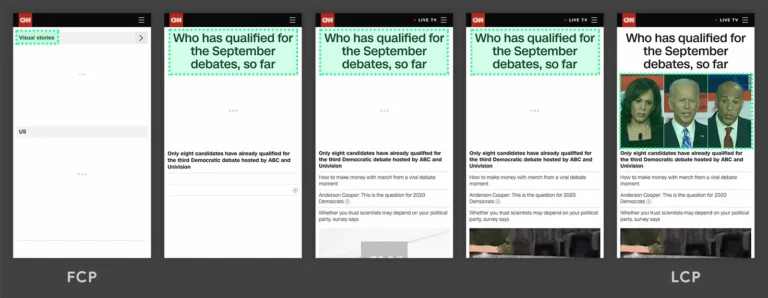
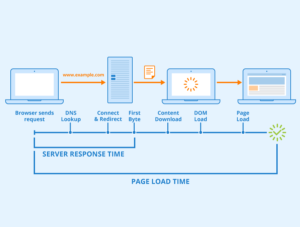
FCP vs LCP example showing First Contentful Paint and Largest Contentful Paint in page load timeline
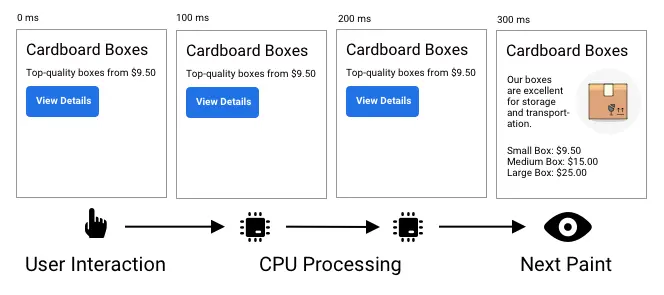
Interaction to Next Paint (INP) example showing user interaction, CPU processing, and next paint timeline

Core Web Vitals are a set of performance metrics introduced by Google to measure real-world user experience.

As of 2026, the three main metrics are:

1. Largest Contentful Paint (LCP)

Measures loading performance.
Good score: under 2.5 seconds

It tracks how fast the largest visible content (image, banner, heading block) loads.

πŸ‘‰ Detailed optimization guide: Largest Contentful Paint Element: How to Fix It

2. Cumulative Layout Shift (CLS)

Measures visual stability.
Good score: under 0.1

It checks if elements unexpectedly move while loading.

πŸ‘‰ Deep guide: How to Fix Cumulative Layout Shift (CLS)

3. Interaction to Next Paint (INP)

Replaced First Input Delay (FID).
Good score: under 200 milliseconds

It measures how quickly a page responds to user interaction.

πŸ‘‰ Advanced topic: How to Fix INP Scores: Core Web Vitals Check & Guide

Why Google Core Web Vitals Matter for SEO

Google officially confirmed that Core Web Vitals are part of the Page Experience ranking signals. While content relevance is still primary, poor performance can reduce competitiveness.

Search terms like:

  • core web vital

  • core web vitals SEO

  • google core web vitals

  • core web vital in SEO

  • core web vital assessment

all show consistent demand because website owners now understand performance = ranking advantage.

Along with user experience, improving how your content appears in search using rich snippets can significantly increase click-through rates.
How Core Web Vitals Impact Rankings in 2026

Google uses real user data from Chrome (CrUX) to evaluate:

  • Page speed

  • Interactivity

  • Stability

If two websites have similar content quality, the faster and smoother website wins.

Real Impact Areas:

  • Lower bounce rate

  • Higher dwell time

  • Better crawl efficiency

  • Higher conversion rate

Performance is not just technical SEO β€” it’s business optimization.

How to Perform a Core Web Vitals Check

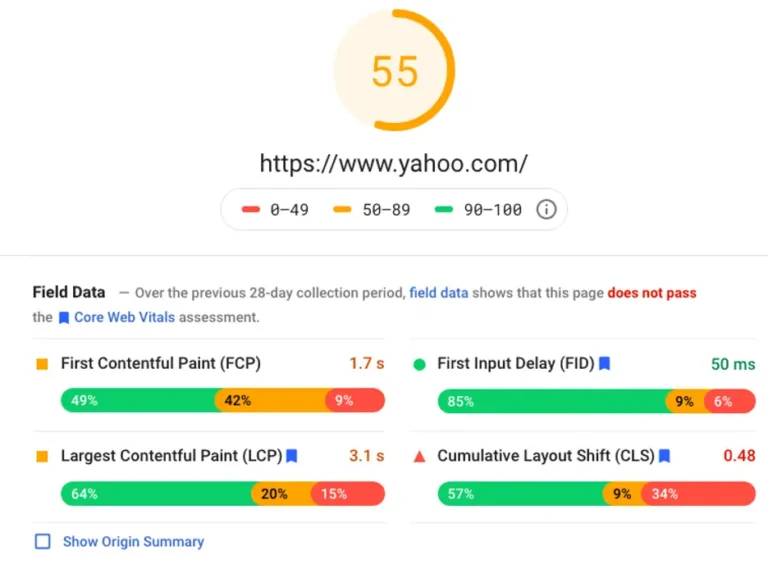
Core Web Vitals field data report showing Yahoo.com performance score 55 with FCP 1.7s, LCP 3.1s and CLS 0.48
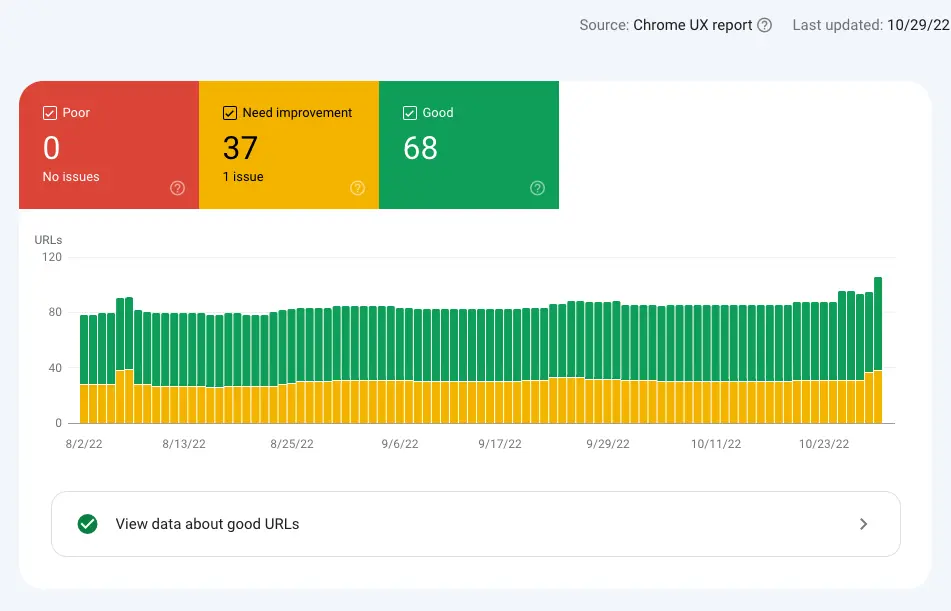
Core Web Vitals Chrome UX Report overview showing 68 good URLs, 37 need improvement, and 0 poor issues
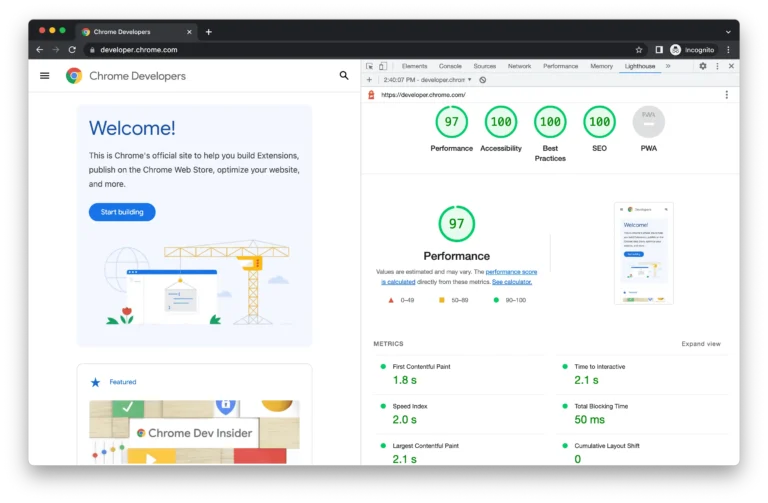
Chrome DevTools Lighthouse report showing 97 performance score with 100 accessibility, best practices and SEO scores

To improve performance, first measure it.

Tools to Use:

  1. Google PageSpeed Insights

    • Provides lab + field data

    • Shows LCP, CLS, INP

  2. Google Search Console

    • Core Web Vital report

    • Groups URLs by performance

  3. Lighthouse

    • Lab-based technical audit

  4. Chrome DevTools Performance Panel

Core Web Vitals Test vs Assessment

  • Core Web Vitals test β†’ Single page measurement

  • Core Web Vitals assessment β†’ Site-wide performance evaluation

πŸ‘‰ To understand the difference between simulated testing and real user data, read our detailed guide on Lab Data vs Field Data Core Web Vitals.
Deep Dive: Largest Contentful Paint (LCP)

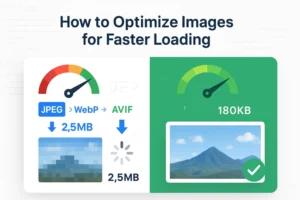
Image optimization comparison showing JPEG vs WebP vs AVIF formats reducing file size from 2.5MB to 180KB for faster page load
Largest Contentful Paint

LCP is often affected by:

  • Slow server response time

  • Large hero images

  • Render-blocking CSS

  • Heavy third-party scripts

How to Optimize LCP:

βœ” Use fast hosting
βœ” Implement CDN
βœ” Compress images (WebP/AVIF)
βœ” Lazy load non-critical images
βœ” Preload important resources

Deep Dive: Cumulative Layout Shift (CLS)

Common CLS causes:

  • Images without width/height

  • Ads loading late

  • Dynamic content injection

  • Web fonts swapping

How to Fix CLS:

βœ” Always define image dimensions
βœ” Reserve ad space
βœ” Avoid inserting content above existing content
βœ” Use CSS transform animations

Why JavaScript Optimization Is Critical for INP

INP measures responsiveness across all interactions.

Heavy JavaScript blocks the main thread, delaying response time.

Optimization Strategies:

βœ” Minify JavaScript
βœ” Remove unused JS
βœ” Use code splitting
βœ” Delay third-party scripts
βœ” Reduce long tasks

πŸ‘‰ Detailed explanation: Read our detailed guide on JavaScript Minimization for Website Speed Optimization.

Lab Data vs Field Data: Professional Approach

Lab Data

  • Simulated environment

  • Controlled testing

  • Useful for debugging

Field Data

  • Real users

  • Real devices

  • Real network conditions

Google rankings rely primarily on field data.

Professional SEOs always compare both before making decisions.

Core Web Vitals SEO Strategy for 2026

To build authority:

Step 1: Create This Pillar Page

Target keywords:

  • core web vital

  • web vitals

  • google core web vitals

  • core web vital SEO

  • core web vital in SEO

Step 2: Build Cluster Pages

Internally link using contextual anchors:

  • Optimize LCP

  • Fix CLS

  • JavaScript optimization

  • Core Web Vital check

Step 3: Technical Implementation

  • Improve hosting

  • Reduce third-party scripts

  • Improve caching

  • Mobile-first optimization

Final Checklist for Passing Core Web Vitals in 2026

  1. LCP under 2.5s

  2. CLS under 0.1

  3.  INP under 200ms

  4. Mobile performance optimized

  5. Pass Core Web Vital assessment in Search Console

Conclusion

Core Web Vitals in 2026 are not optional. They are foundational.

  • If your content is strong but performance is weak, rankings suffer.
  • If performance is optimized and content is high-quality, growth becomes sustainable.

This pillar page gives you the complete framework.

Now the next step is implementation:

  • Start with a full Core Web Vital check

  • Fix LCP issues

  • Eliminate CLS

  • Optimize JavaScript for better INP

  • Compare lab and field data

Master these, and you master modern technical SEO

Once Core Web Vitals are optimized, the next layer of Page Experience is structured data. AddingΒ FAQ schema markupΒ to your key pages signals content clarity to Google and increases your chances of appearing in rich results and AI-generated answers.

FAQ:

Core Web Vitals are a set of specific factors that Google uses to measure how a user experiences your webpage. Think of them as a "health check" for your site’s speed, responsiveness, and visual stability. If your site passes these tests, Google is much more likely to show your content to users because it knows they will have a smooth, frustration-free experience

Google uses these metrics as a key ranking signal, meaning they act as a tie-breaker between similar websites. If you and a competitor have equally good information, but your website loads faster and doesn't "jump" around while loading, Google will rank your site higher. Additionally, fast-loading sites are more likely to be featured in AI-generated search summaries.

For a great user experience and a "Passing" grade from Google, your main content should appear in under 2.5 seconds. This is measured by a metric called Largest Contentful Paint (LCP). If your site takes longer than 3 or 4 seconds to show its main image or text, users are likely to leave, and your search engine ranking could drop.

This delay is often caused by a high Interaction to Next Paint (INP) score. In 2026, Google measures how quickly your site reacts to every click or tap a user makes. If your site is busy running heavy background scripts (like unoptimized chatbots or tracking tools), it can feel "frozen" for a split second. Keeping your code clean ensures that every button press feels instant.

The easiest way is to use free tools like Google Search Console or PageSpeed Insights. These tools give you a simple "Pass" or "Fail" grade based on real data from your actual visitors. If you see a "Fail" notice, the report will tell you exactly which page is slow and what specific technical issue is causing the delay so you can fix it quickly.