
Lab Data vs Field Data Core Web Vitals: Complete Guide to Professional Website Performance Testing
Website speed and user experience have become essential ranking factors for modern SEO. Google introduced Core Web Vitals to measure how real users experience a webpage in terms of loading performance, interactivity, and visual stability. To analyze these metrics, developers and SEO professionals rely heavily on tools such as Lighthouse and PageSpeed Insights.
However, when analyzing a website’s performance, many people notice something confusing: the numbers in the Lab Data section often differ from the Field Data section. Understanding why this happens and how professionals evaluate both datasets is crucial for conducting a reliable website performance audit.
This guide explains the difference between Lab Data and Field Data, how tools like Google Lighthouse testing work, and how to perform a professional Core Web Vitals check.
Understanding Lab Data vs Field Data Core Web Vitals and Website Performance Testing

Core Web Vitals are performance metrics that help measure the real experience users have when interacting with a website. These metrics are part of Google’s page experience signals used to evaluate the quality of a webpage.
Performance tools such as Google Lighthouse testing and PageSpeed Insights analyze a webpage and generate reports that show loading speed, resource usage, and optimization opportunities.
Lighthouse is an open-source automated tool developed by Google that audits webpages for performance, accessibility, best practices, and SEO.
It can run audits on any website and provides a score along with recommendations for improving the website’s performance.
These tools are widely used in processes such as:
- lighthouse performance testing
- lighthouse page speed test
- lighthouse website speed test
- lighthouse accessibility testing
Many developers rely on them to perform a professional Core Web Vitals audit.
These metrics are explained in depth in our Complete Guide to Core Web Vitals in 2026, which covers how Google evaluates page experience signals.
What Is Lab Data in Core Web Vitals Testing
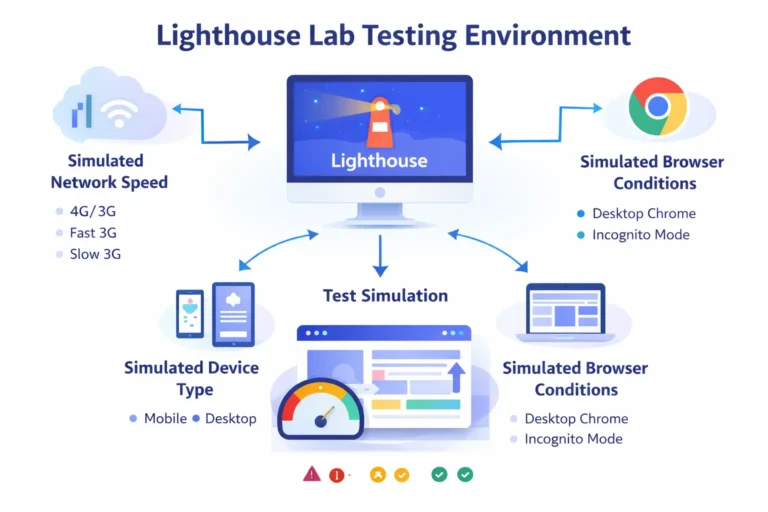
Lab data refers to performance metrics collected in a controlled testing environment. Instead of measuring how real users interact with the website, a testing tool simulates the experience under predefined conditions.
This type of testing is commonly called synthetic monitoring.
For example, when you run a Lighthouse speed test, the system loads the page under specific conditions such as:
- predefined device type
- simulated network speed
- a specific browser version
- no browser cache
These standardized conditions make the test results consistent and reproducible.
In tools like PageSpeed Insights, lab data is generated by Lighthouse running automated diagnostics in a simulated environment.
Because the environment is controlled, lab data is extremely useful for:
- debugging performance issues
- testing new optimizations
- comparing performance before and after code changes
However, lab data does not represent the experience of actual users visiting the site.
What Is Field Data in Core Web Vitals Performance Analysis
Field data is completely different from lab data. Instead of simulations, field data measures how real users experience a webpage in the real world.
This information is collected from the Chrome User Experience Report (CrUX), which aggregates real browsing data from Chrome users over time.
The dataset used in PageSpeed Insights is typically aggregated over 28 days of real user interactions.
Because the data comes from real users, it reflects a wide variety of factors such as:
- different devices
- network speeds
- geographic locations
- browser versions
- user behavior
This makes field data the most accurate indicator of how visitors experience a website.

Why Lab Data vs Field Data Core Web Vitals Show Different Results
It is very common for lab data and field data scores to differ.
This happens because they are collected in entirely different ways.
Lab tests simulate a controlled environment, while field data measures real-world browsing conditions. As a result, lab results often represent worst-case scenarios compared to real user experiences.
Research from DebugBear explains that field data often reflects the worst 25% of real user experiences, while lab testing may represent even more extreme scenarios.
Another reason for the difference is that lab testing is limited to a single device and network environment. Field data, on the other hand, includes data from many types of devices and network conditions across different locations.
Because of this variation, performance results can appear inconsistent if someone relies on only one type of data.
Limitations of Lighthouse and PageSpeed Insights in Core Web Vitals Testing
Although Lighthouse and PageSpeed Insights are powerful tools, they have certain limitations.
One major limitation is that Lighthouse performs synthetic tests rather than real user monitoring, meaning it must assume how an average user interacts with the website.
This means Lighthouse cannot determine:
- which pages real users visit most often
- how different network conditions affect users
- which performance issues impact conversions or revenue
Another limitation mentioned by performance experts is that PageSpeed Insights data may update slowly because it relies on historical user data aggregated over weeks.
Because of these factors, relying only on Lighthouse scores does not provide a complete picture of real website performance.
Real User Monitoring (RUM) and Why It Matters
Real User Monitoring (RUM) is a technique used to measure website performance using data from real visitors.
Instead of simulating conditions, RUM collects performance metrics during actual page loads. This provides deeper insights into how users interact with the website across devices and network environments.
According to performance research, field data collected through RUM provides a more realistic view of user experience than lab testing alone.
For example, a website might load quickly in a Lighthouse test, but real users on slower mobile networks may experience delays.
Without real user monitoring, these issues could remain undetected.
How Professionals Analyze Lab Data vs Field Data Core Web Vitals

A professional website performance audit does not rely on a single tool or metric. Instead, experts combine several approaches to evaluate performance accurately.
The typical process includes three stages
1. Run a Lighthouse Performance Test
The first step is running a Lighthouse website speed test using tools such as:
- Chrome DevTools Lighthouse
- PageSpeed Insights
- WebPageTest
- automated lighthouse testing tools
These tests provide lab data that helps identify technical issues such as:
- render-blocking resources
- large JavaScript files
- unoptimized images
- unused CSS
Because lab tests are reproducible, they are ideal for debugging performance problems.
2. Analyze Field Data in PageSpeed Insights
The second step is analyzing the field data section of PageSpeed Insights.
This section shows how real users experience the website and includes Core Web Vitals metrics such as:
- Largest Contentful Paint (LCP)
- Interaction to Next Paint (INP)
- Cumulative Layout Shift (CLS)
Field data allows professionals to understand whether real users experience performance problems across devices and networks.
3. Combine Lab Data and Field Data
The most accurate performance analysis happens when both datasets are used together.
Lab data helps diagnose issues quickly, while field data confirms whether those issues actually impact real users.
Google’s PageSpeed Insights combines both types of data so developers can see real-world user experience alongside diagnostic performance insights.
This combined approach is considered best practice for professional website performance testing.
Tools Used for Professional Website Speed Testing
Several tools are commonly used when performing performance analysis.
Google Lighthouse
Lighthouse is one of the most popular tools for auditing web pages. It evaluates performance, accessibility, SEO, and best practices and generates detailed reports for developers.
PageSpeed Insights
PageSpeed Insights analyzes a website using both lab diagnostics from Lighthouse and real-world field data from the Chrome User Experience Report.
WebPageTest
WebPageTest allows performance testing from multiple geographic locations and network conditions, providing detailed waterfall charts and loading metrics.
These tools together provide a more complete understanding of website performance.
Why Website Performance Matters for SEO
Website speed and performance are not only technical concerns—they also influence business outcomes.
Research shows that even a small improvement in load time can significantly increase conversion rates and improve user engagement.
For example, studies have found that improving page load time by a fraction of a second can increase conversion rates by up to 8%.
This demonstrates why performance optimization and Core Web Vitals monitoring are critical for modern websites.
Best Practices for Analyzing Lab Data vs Field Data Core Web Vitals
When performing website performance testing, professionals follow several best practices:
- Run multiple lighthouse speed tests instead of relying on a single report.
- Compare lab results with field data to identify real performance issues.
- Monitor performance regularly instead of running occasional tests.
- Analyze performance across different devices and network speeds.
- Use real user monitoring to track long-term performance trends.
These steps help ensure that optimization efforts actually improve user experience rather than simply increasing Lighthouse scores.
Conclusion
Understanding the difference between Lab Data and Field Data is essential for anyone analyzing Core Web Vitals or performing website speed optimization.
Lab data, generated through tools like Lighthouse testing, provides controlled and reproducible performance diagnostics. Field data, collected from real users through the Chrome User Experience Report, reveals how visitors actually experience the website.
Because both datasets measure performance in different ways, their results may not always match. For a professional Core Web Vitals check, experts analyze both types of data together to gain a complete understanding of website performance.
By combining Lighthouse performance testing, PageSpeed Insights analysis, and real user monitoring, developers and SEO professionals can accurately diagnose performance issues and improve the overall user experience of a website.
FAQ
Lab data is collected in a controlled testing environment using tools like Lighthouse, where performance is simulated under specific conditions such as network speed and device type. Field data, on the other hand, is collected from real users visiting the website and is based on actual browsing experiences recorded in the Chrome User Experience Report. Because one is simulated and the other reflects real-world conditions, their results may differ.
PageSpeed Insights shows both types of data because they measure performance differently. Lab data comes from a Lighthouse test that runs in a simulated environment, while field data is based on real user interactions over time. Differences occur because real users access websites from various devices, network speeds, and locations.
Google primarily relies on field data from the Chrome User Experience Report (CrUX) when evaluating Core Web Vitals for ranking purposes. This dataset reflects the real experience of Chrome users over the previous 28 days, making it more representative of actual user experience than simulated lab tests.
Lighthouse testing is useful for identifying performance issues and diagnosing optimization opportunities. However, it should not be used alone to measure overall user experience. Professionals typically combine Lighthouse lab testing with field data analysis and real user monitoring to obtain a more accurate understanding of website performance
Professionals usually follow a structured approach when analyzing website performance. First, they run Lighthouse or similar tools to identify technical issues affecting performance. Next, they analyze field data in PageSpeed Insights to see how real users experience the website. Finally, they combine insights from both datasets to identify performance problems and prioritize optimization efforts.