
On Page SEO: The Complete 2026 Guide for WordPress Beginners (Free Tools Only)
Quick Start (5 Minutes) — Do This Before Reading Further
Already know the basics and just want a quick checklist? Here it is. Come back to the full guide when you have time.
Before you hit “Publish” on any blog post, check these 5 things:
- Title tag — does it include your main keyword and is it under 60 characters?
- Meta description — is it between 150–160 characters with a clear benefit?
- H1 heading — does it match your page topic and include the primary keyword?
- Internal links — have you linked to at least 2–3 of your other relevant articles?
- Image alt text — does every image have a descriptive alt tag?
If all five are done — great. If not, fix them now. These five alone will put you ahead of most websites in your niche.
For a complete step-by-step walkthrough of each item, read our on-page SEO checklist 2026 guide.
Now, let’s go deeper.
What Is On-Page SEO? (Simple Explanation)
Let’s be honest — when most people hear “SEO,” they think of some complicated technical process that requires expensive tools and years of experience.
It does not.
On-page SEO is simply the practice of optimizing the content and structure of your webpage so that Google can understand it and show it to the right people at the right time.
Think of it this way. You run a shop. On-page SEO is how you arrange the shop — the signboard outside (title tag), the products displayed properly (your content), the price tags (meta description), and the signs pointing customers to related sections (internal links). If your shop is well-organized, customers find what they want and come back. If it’s messy, they leave.
According to Google’s own Search Central documentation, the goal of on-page optimization is to help search engines understand your pages and match them to relevant searches. That’s it. Everything else follows from this one idea.
On-Page SEO vs Off-Page SEO vs Technical SEO
These three get mixed up all the time, so let’s sort it out quickly:
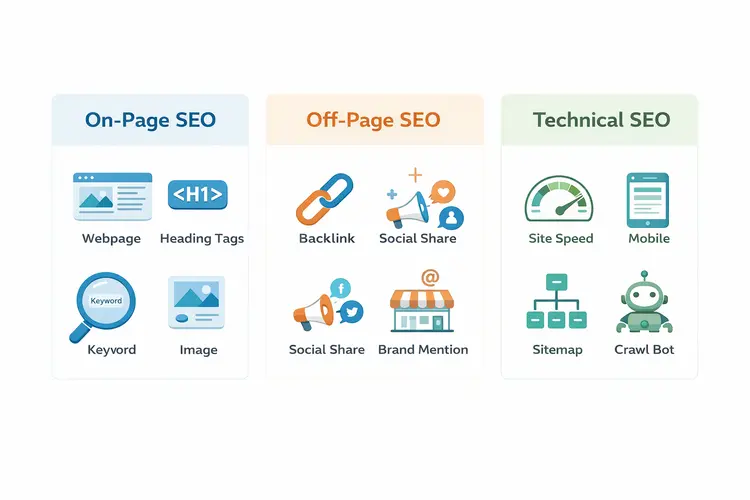
- On-page SEO — everything you do on your webpage itself. Title tags, content, headings, images, internal links. You control this 100%.
- Off-page SEO — what happens outside your website. Backlinks from other sites, social signals, brand mentions. You influence this but don’t fully control it.
- Technical SEO — the behind-the-scenes stuff. Site speed, mobile-friendliness, crawlability, XML sitemaps. This is the foundation everything else sits on.
In this guide, we are focusing entirely on on-page SEO — because for a new or growing website, this is where you will get the fastest results with the most control.
The 10 On-Page SEO Factors That Actually Matter (With Free Tools)
This section is the heart of the guide. We are going to walk through each factor with practical steps you can take today — using only free tools.
No Semrush subscription required. No Ahrefs account needed. Just you, your WordPress site, and the free tools that actually work.
1. Keyword Research First — Everything Starts Here
Before you write a single word, you need to know what your target reader is actually searching for.
This is where most beginners go wrong. They write about what they want to write, not what their audience is searching for. The result? A great article that no one finds.
Not sure how to find the right keyword? Follow Step 1 of our on-page SEO checklist
How to do keyword research for free:
Open Google Keyword Planner (free with a Google Ads account — no ad spend needed). Type in your broad topic — for example, “on page SEO.” You will see a list of related keywords with monthly search volumes.
For a new website like yours, target keywords with:
- Monthly searches between 1,000 and 10,000
- Competition: Low or Medium
Avoid going after high-volume, high-competition terms like “SEO” or “digital marketing” — established websites with years of authority own those positions. Your sweet spot is specific, clear, answerable questions.
Quick check before writing: Type your target keyword into Google. Look at the top 3 results. If they are all DA 70+ giants (Semrush, Moz, HubSpot), pick a more specific variation. If some results are from smaller blogs or forums — that’s your signal that you can compete.
2. Search Intent — The Most Underrated On-Page Factor
You can optimize a page perfectly and still not rank — if you target the wrong search intent.
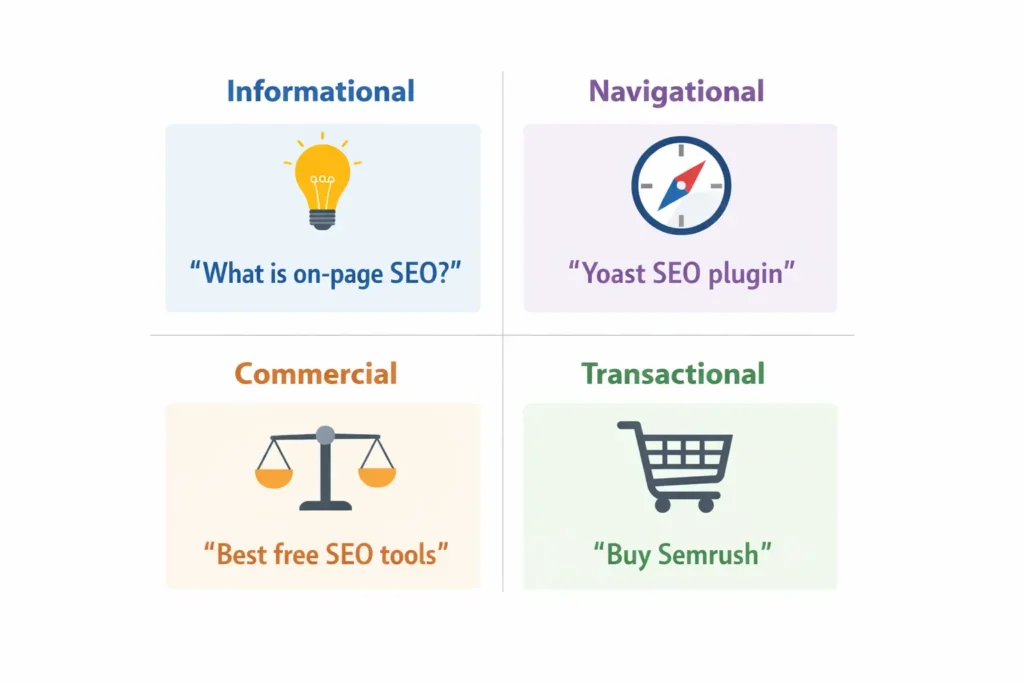
Search intent is the reason behind someone’s search. Google groups it into four types:
- Informational — “What is on page SEO?” The reader wants to learn something.
- Navigational — “Yoast SEO plugin” The reader wants to find a specific site.
- Commercial — “Best SEO tools for beginners” The reader is comparing options before buying.
- Transactional — “Buy Semrush subscription” The reader is ready to take action.
Before writing, check what Google is already showing for your target keyword. If Google shows listicles and how-to guides — write a how-to guide. If it shows comparison articles — write a comparison. Google is already telling you what format works best. Listen to it.
3. Title Tag — Your First and Most Important On-Page Element
The title tag is the clickable blue headline you see in Google search results. It is arguably the single most important on-page SEO element on your page.
Need a real example? See the before/after title tag case study in our title tag optimization guide.
Best practices for title tags in 2026:
Keep it between 50–60 characters. Beyond 60 characters, Google cuts it off with “…” in the search results — and that looks unprofessional.
Put your primary keyword near the beginning of the title. “On-Page SEO Guide for WordPress Beginners” is better than “A Beginner’s Guide to Understanding On-Page SEO in WordPress.”
Make it compelling, not just keyword-stuffed. Your title competes with 9 other results on the same page. Ask yourself: if I were searching for this, would I click on my result?
Good title examples:
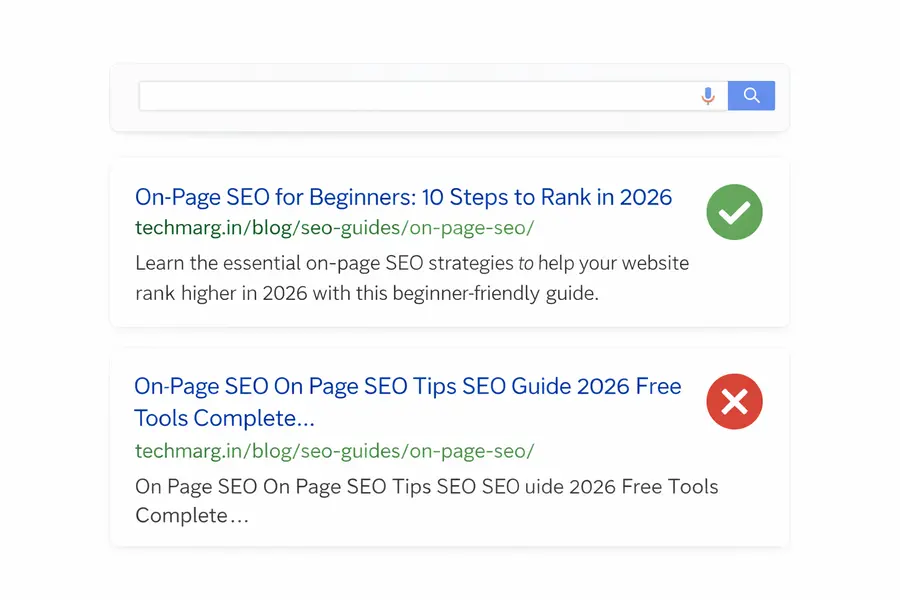
- On-Page SEO for Beginners: 10 Steps to Rank in 2026
- What Is On-Page SEO? A Simple Guide With Free Tools
- On-Page SEO Checklist: 15 Things to Do Before You Publish
Bad title examples:
- On Page SEO On Page SEO Tips SEO Guide 2026 (keyword stuffing)
- My Thoughts on SEO (no keyword, no benefit)
How to check your title tag in WordPress (free): Install the Yoast SEO plugin or Rank Math — both are free. They show a live preview of how your title will appear in Google search results, and give you a character count. Use either one — both work excellently for WordPress.
4. Meta Description — Write for Clicks, Not Just for Google
The meta description is the short paragraph below your title in search results. Here is the truth that most guides don’t emphasize enough: meta descriptions are not a direct ranking factor.
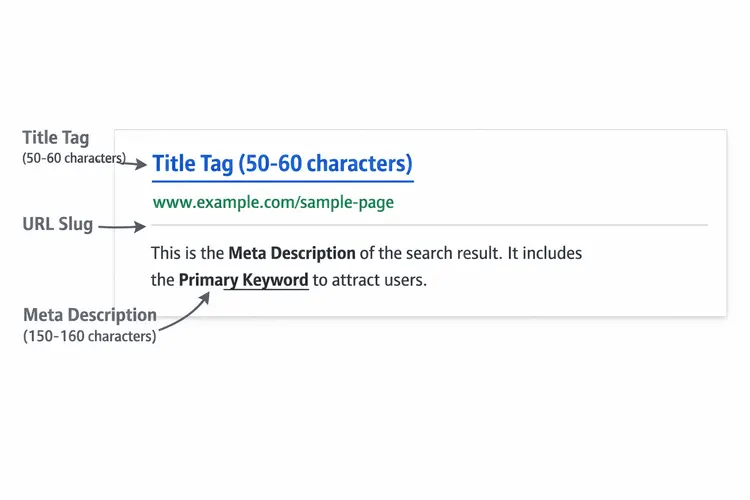
Google sometimes ignores your meta description entirely and pulls its own snippet from your content. So why bother?
Because a well-written meta description dramatically increases your click-through rate (CTR). More people clicking on your result sends Google a positive signal, which indirectly helps your ranking. It’s a virtuous cycle.
How to write an effective meta description:
- Keep it between 150–160 characters (Yoast SEO shows this live)
- Include your primary keyword naturally — Google bolds it in search results when it matches the user’s query
- Answer “what will I get from this page?” in one sentence
- End with a soft call-to-action: “Learn how,” “See examples,” “Get the checklist”
Real example for this article:
“Learn on-page SEO step-by-step using only free tools. WordPress-friendly guide with real examples and a ready checklist. No paid tools needed.”
Notice it mentions the benefit (free tools, WordPress-friendly), the format (checklist, examples), and creates curiosity without being clickbait.
5. Headings Structure — How to Use H1, H2, H3 Correctly
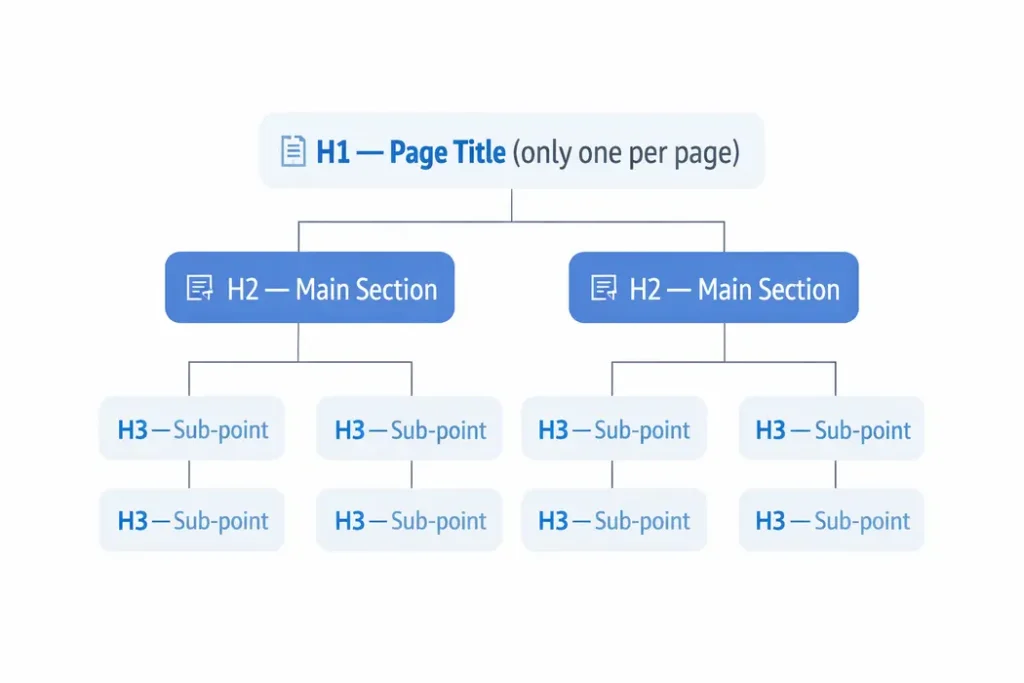
Every page should have exactly one H1 heading — your main title. Think of it as the cover of a book. There should only be one cover.
Below that, use H2 headings for your main sections, and H3 headings for sub-points within those sections. This hierarchy helps Google understand the structure of your content — and helps readers quickly scan and find what they need.
Common mistakes to avoid:
Using multiple H1s on one page — this confuses Google about what the page is really about.
Skipping heading levels (going from H2 directly to H4) — this breaks the logical structure.
Writing headings that are just keyword dumps — “On Page SEO On Page SEO Tips 2026” is not a heading, it’s spam.
Keyword tip: Include your primary keyword in your H1. Include secondary and related keywords naturally in your H2s. This alone signals to Google what topics your page covers.
In WordPress, your post title automatically becomes your H1. In the editor, use the Paragraph dropdown to set H2 and H3 for your sections.
6. Content Optimization — Write for Humans, Optimize for Google
This is the part most guides either oversimplify (“just write good content!”) or overcomplicate (“maintain keyword density of 1.5%!”). Here’s the practical middle ground.
Keyword placement that actually works:
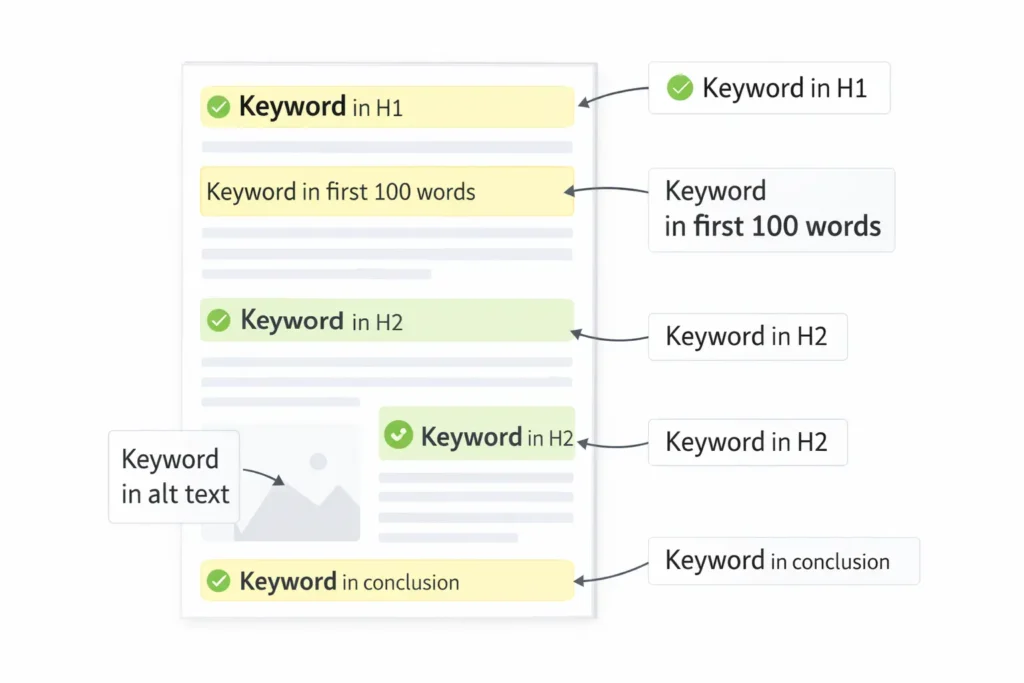
Include your primary keyword in the first 100 words of your article. Not forced — just naturally. In this very guide, “on-page SEO” appears in the first paragraph because the article is about on-page SEO.
Use your keyword in at least 2–3 of your H2 headings — again, naturally. If it doesn’t fit naturally, don’t force it. Google is smart enough to understand context.
Use related keywords and synonyms throughout. If your primary keyword is “on page SEO,” related terms include: on-page optimization, SEO techniques, webpage optimization, search engine optimization tips. Sprinkling these signals topical depth to Google.
Content length guidance for 2026:
There is no magic word count. However, as a general principle: if the top-ranking pages for your keyword are 2,000+ words, writing 500 words will not beat them. Match or exceed the depth of existing top results — but don’t pad with fluff just to hit a number.
For most how-to SEO guides, aim for 2,500–3,500 words. For a checklist, 1,500–2,000 words is fine.
E-E-A-T — Google's quality signal:
Google evaluates your content on Experience, Expertise, Authoritativeness, and Trustworthiness. For a personal blog or small business site, the best way to demonstrate this is:
- Write from your own experience (“When I optimized my article on techmarg.in, here’s what I changed…”)
- Cite credible external sources (link to Google’s official documentation, not random blogs)
- Include an author bio with your real name and credentials
7. URL Structure — Short, Clean, and Keyword-Rich
Your URL is another on-page signal Google reads. Keep it simple.
Good URL: techmarg.in/blog/seo-guides/on-page-seo/
Bad URL: techmarg.in/blog/?p=1234 or techmarg.in/blog/on-page-seo-guide-for-beginners-complete-guide-2026/
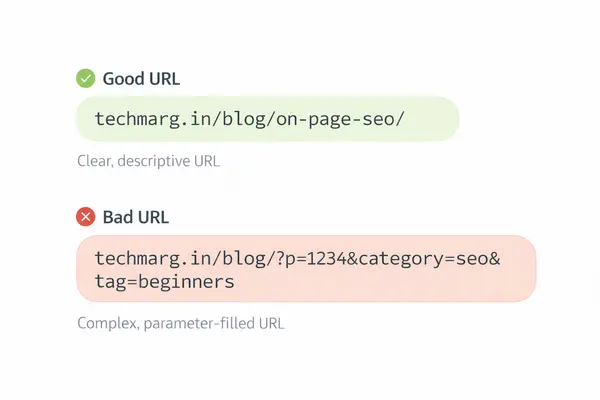
URL best practices:
- Include your primary keyword
- Keep it short — 3 to 5 words maximum
- Use hyphens, not underscores (Google reads hyphens as word separators)
- No capital letters, no dates (dates make articles feel outdated quickly)
In WordPress, go to Settings → Permalinks and select “Post name” — this sets all your URLs to the clean /post-title/ format automatically.
8. Image Optimization — The Most Ignored On-Page Factor
Most beginners spend zero time on image optimization. This is a mistake because images are one of the easiest quick wins in on-page SEO.
File name: Before uploading an image, rename it descriptively. on-page-seo-checklist.png is infinitely better than IMG_20240315_134521.png. Google reads file names.
Alt text: Every image needs an alt text — a short description of what the image shows. This helps Google understand the image, and it helps visually impaired users who use screen readers. Keep alt text descriptive and natural: on-page SEO checklist showing 10 optimization steps is good. on page SEO on page SEO tips SEO is spam.
File size: Large images slow down your page, which hurts both user experience and your Google ranking. Before uploading any image, compress it using Squoosh (squoosh.app) — it’s completely free, works in your browser, and can reduce image sizes by 60–80% without visible quality loss.
File format: Use WebP format whenever possible. WebP images are significantly smaller than JPEGs or PNGs at the same quality. Squoosh lets you convert to WebP for free.
9. Internal Linking — How to Build a Web That Google Loves
Internal linking is connecting your own articles to each other with clickable links. It is one of the most powerful on-page SEO techniques — and one of the most consistently underused by beginners.
Here is why it matters: when you publish a new article, Google has to find it and crawl it. Internal links from your existing articles are like paths that lead Google’s crawlers directly to your new content. The more internal links pointing to an article, the more important Google considers it to be.
Internal links also help your readers discover more of your content — keeping them on your site longer, which is another positive signal.
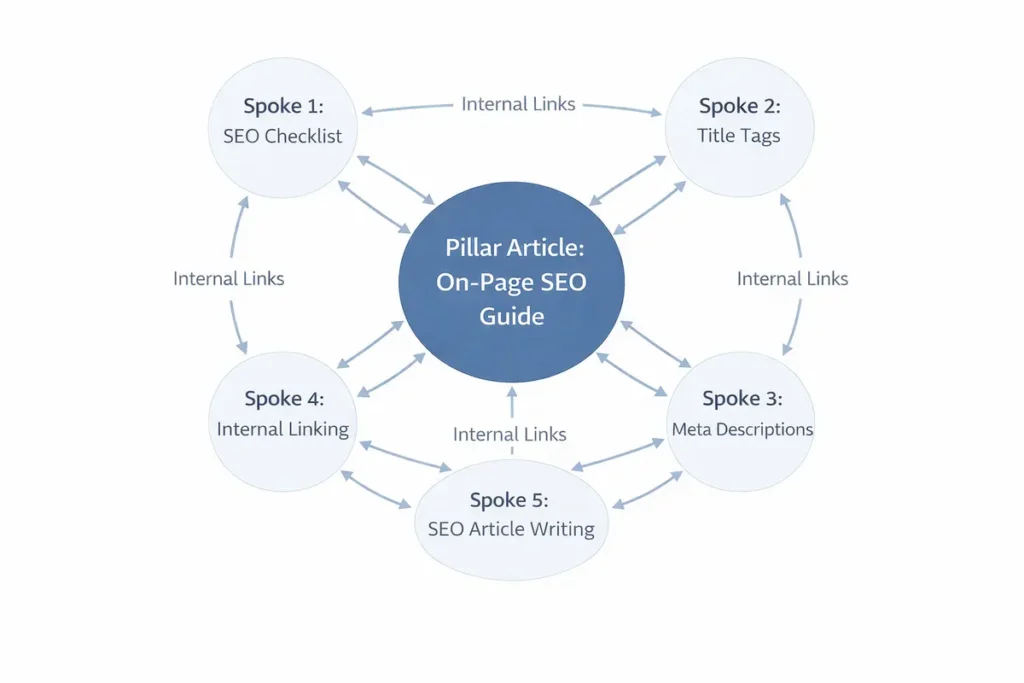
How to do internal linking correctly:
Add at least 3–5 internal links in every article you publish. Link to articles that are genuinely relevant — not just any article on your site.
Use descriptive anchor text — the clickable words of the link. “Click here” tells Google nothing. “On-page SEO checklist” tells Google exactly what the linked page is about.
Go back to your older articles periodically and add links to your newer posts. This is called “retroactive internal linking” and it is very effective for new websites.
10. Page Speed — The Technical Factor You Cannot Ignore
Page speed is a confirmed Google ranking factor. A page that loads slowly frustrates users and Google penalizes it in rankings.
The good news: you don’t need a developer to fix most speed issues.
How to check your page speed (free):
Use Google PageSpeed Insights (pagespeed.web.dev). Enter your URL and it gives you a score out of 100 for both mobile and desktop, plus specific recommendations to fix issues.
Common speed fixes for WordPress (all free):
Install LiteSpeed Cache or W3 Total Cache — free caching plugins that dramatically improve load time.
Use Smush or Imagify (free tier) to auto-compress images as you upload them.
Choose a lightweight WordPress theme. Heavy themes with dozens of scripts slow everything down.
Aim for a PageSpeed score of 70+ on mobile. Above 90 is excellent. Below 50 means serious problems to fix.
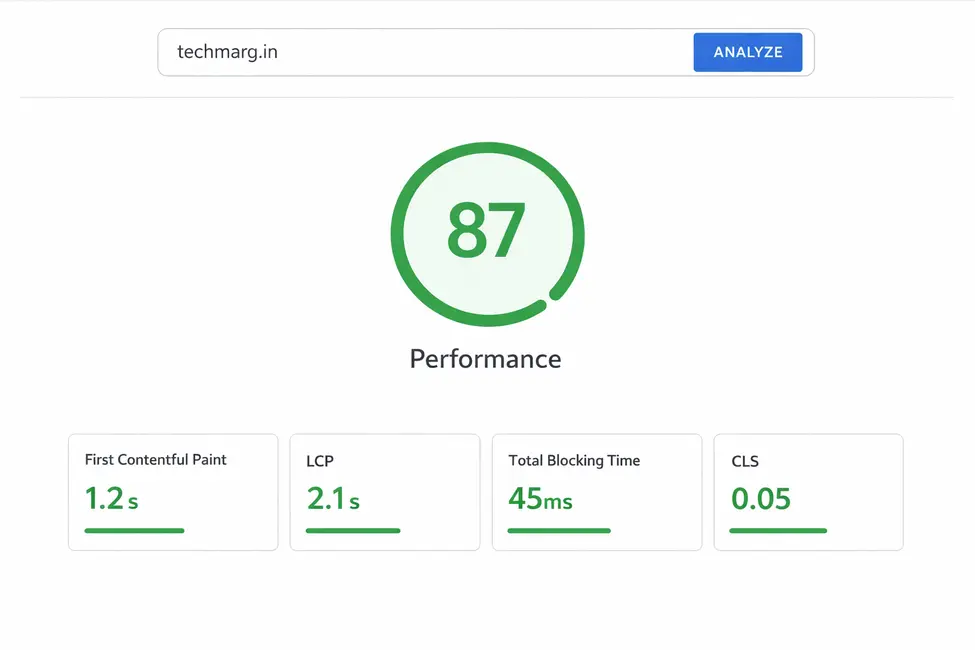
Real Example: How I Applied On-Page SEO to a Techmarg.in Article
Here is the part that most SEO guides skip — a real, live example.
Let’s take the CLS guide published on techmarg.in: “How to Fix CLS Issue — Complete 2026 Guide.”
Before on-page optimization:
- Title tag: “How to Fix CLS Issue (Cumulative Layout Shift) — Complete 2026 Guide for WordPress, Shopify & More” — 97 characters, too long, gets cut off in search results
- No internal links to or from this article
- Images had generic file names
After on-page optimization (what to change):
- Title tag: “How to Fix CLS in WordPress: Complete Guide (2026)” — 50 characters, clean, keyword at front
- Add internal links from the pillar article (on-page SEO guide) pointing to this article
- Rename images to
cls-fix-wordpress-2026.pngformat - Add FAQ schema at the bottom targeting “What causes CLS?” and “How do I check my CLS score?”
This kind of real, site-specific example is what builds genuine trust with your readers — and it demonstrates the Experience component of Google’s E-E-A-T guidelines.
On-Page SEO Checklist: 15 Steps Before You Hit Publish
Print this. Save it. Use it for every article.
Keyword & Intent
- Primary keyword is identified and matches search intent
- Keyword has 1K–10K monthly search volume (checked in Keyword Planner)
- Search intent matches your content format (how-to, list, guide)
Title & Meta
- Title tag includes primary keyword, is under 60 characters
- Meta description is 150–160 characters with a clear benefit
- URL slug is short, keyword-rich, and uses hyphens
Content Structure
- Only one H1 on the page
- Primary keyword appears in first 100 words
- Keyword appears naturally in at least 2 H2 headings
- Related/LSI keywords used throughout the content
- Content depth matches or exceeds top 3 ranking pages
Technical & On-Page
- All images have descriptive file names and alt text
- Images compressed before upload (Squoosh)
- At least 3–5 internal links to relevant articles
- PageSpeed score checked (target: 70+ on mobile)
- Article submitted to Google via GSC (URL Inspection → Request Indexing)
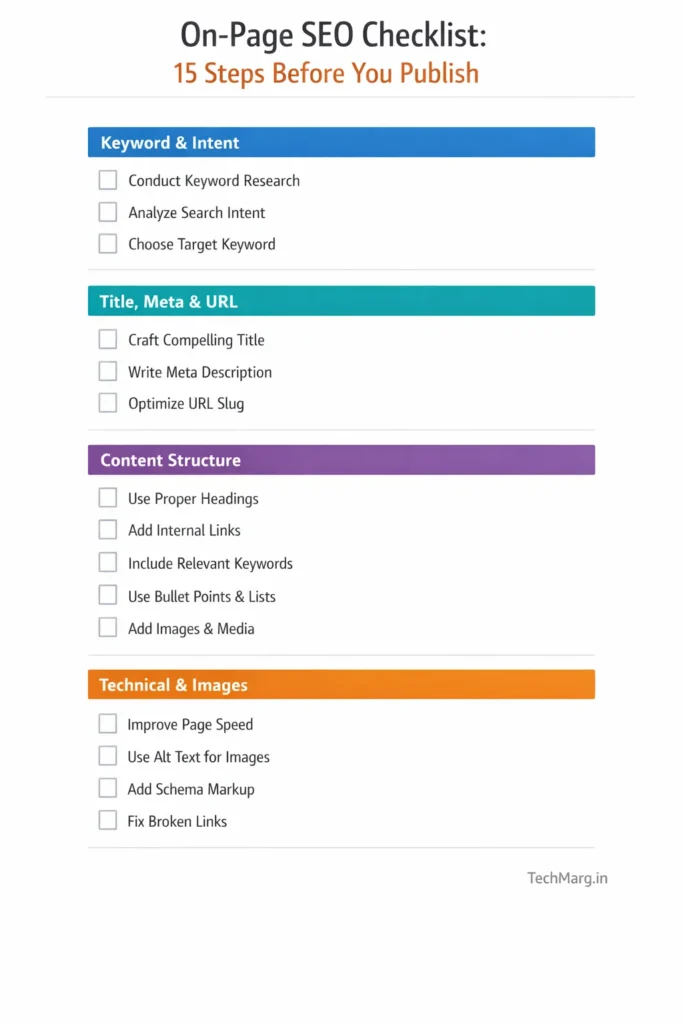
Free Tools Summary — Everything You Need, Nothing You Have to Pay For
| Task | Free Tool |
|---|---|
| Keyword research | Google Keyword Planner |
| Title tag & meta preview | Yoast SEO or Rank Math (WordPress plugin) |
| Page speed check | Google PageSpeed Insights |
| Image compression | Squoosh (squoosh.app) |
| Index status check | Google Search Console |
| Crawlability check | Google Search Console Coverage report |
| Structured data test | Google's Rich Results Test |
| Rank tracking | Google Search Console Performance report |
Every single tool in this table is completely free. You can do professional-level on-page SEO without spending a single rupee.
Every single tool in this table is completely free. You can do professional-level on-page SEO without spending a single rupee. Each tool is explained in action inside our complete on-page SEO checklist guide.
On-Page SEO vs Off-Page SEO: What to Focus on First?
This is a genuine debate in the SEO community. Here is the straightforward answer for a new website:
Start with on-page SEO — always.
You cannot build a house without a foundation. Off-page SEO (getting backlinks, building domain authority) requires people to trust and link to your content. But they will only link to well-structured, genuinely helpful content. That means your on-page work comes first.
A common mistake new bloggers make: they spend months chasing backlinks before their on-page SEO is solid. The result is that even if they get backlinks, the pages don’t convert those signals into rankings because the basic on-page factors are missing.
Get your on-page SEO right first. Then layer off-page SEO on top.
Start with on-page SEO — always. Follow the complete on-page SEO checklist first, before you do any off-page or link building work.
Common On-Page SEO Mistakes (And How to Fix Them)
Mistake 1: Targeting keywords that are too competitive
Fix: Use Google Keyword Planner. Filter results to 1K–10K monthly volume, Low/Medium competition. Target those first.
Mistake 2: Writing one article and waiting for results
Fix: On-page SEO works at the cluster level, not just the article level. Publish 5–6 interlinked articles on the same topic. Topical clusters rank faster than isolated articles.
Mistake 3: Ignoring mobile optimization
Fix: Google uses mobile-first indexing — it checks the mobile version of your site first. Test every article on your phone before publishing. Use a mobile-responsive WordPress theme.
Mistake 4: No internal links
Fix: Every time you publish a new article, go back to your three most-visited older articles and add a link to the new one. Takes 5 minutes. Makes a significant difference.
Mistake 5: Treating the title tag and H1 as the same thing
Fix: In WordPress, your post title becomes your H1 automatically. But your SEO title (set in Yoast or Rank Math) can be different. Your H1 can be more reader-friendly; your SEO title can be more keyword-optimized. Use this to your advantage.
Frequently Asked Questions
On-page SEO is optimizing the content and structure of your webpage — things like the title, headings, images, and internal links — so Google can understand it and show it to people searching for related topics.
For a new website, expect to see initial rankings in 3–6 months. This depends on your niche's competition level, how frequently you publish, and the quality of your content. Pages submitted to Google Search Console via URL Inspection tend to get indexed faster — often within 24–72 hours.
Absolutely yes. Google Keyword Planner, Google Search Console, PageSpeed Insights, Squoosh, and Yoast SEO (free version) cover all your on-page SEO needs without any cost.
On-page SEO is about the content you see on the page — titles, headings, text, images. Technical SEO is about the infrastructure behind the page — site speed, mobile-friendliness, XML sitemaps, structured data. Both matter, but on-page SEO is the better starting point for beginners.
There is no single most important factor — it's a combination. But if forced to pick three: (1) matching your content to the user's search intent, (2) a well-written title tag with the right keyword, and (3) genuinely helpful content that answers the reader's question completely.
On-page SEO is not magic. It is not complicated. And it definitely does not require expensive tools or a marketing agency.
It is the practice of making your content clear, structured, and genuinely useful — for your readers first, and for Google second. Get that order right, and Google will follow.
Start with the 15-point checklist above. Apply it to your next article. Then the one after that. The results will come — steadily and consistently.