
Rich Snippets for Articles: The Complete Article Schema Markup Guide for Bloggers (2026)
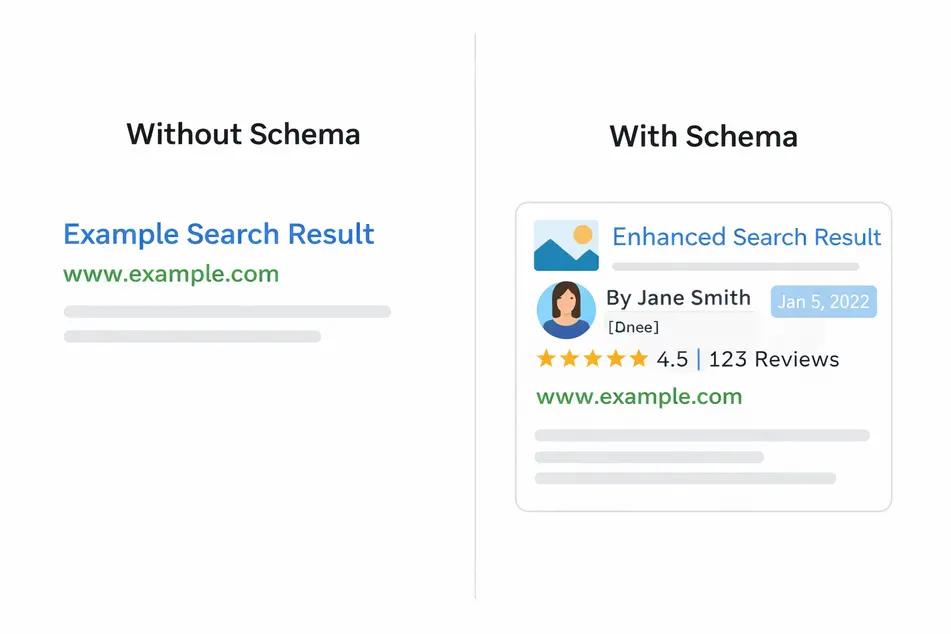
Rich snippets for articles are the enhanced Google search listings that display a featured image, author name, and publish date alongside your title — while every competing result shows a plain blue link. The gap between those two experiences is created by a single piece of code: article schema markup.
Article schema markup is structured data markup — a JSON-LD script block added to your blog post — that communicates your content’s metadata directly to Google. It does not change what visitors see on your page. But behind the scenes it tells search engines exactly who wrote the content, when it was published, and what organisation produced it.
Rich snippets for articles are enhanced search results generated when Google reads valid article schema markup on a blog post. They display a featured image, author name, and publish date in the SERP. They are enabled by adding structured data markup — using schema.org article types such as BlogPosting, Article, or NewsArticle — to your page’s <head> section.
According to Google’s own documentation, structured data markup helps search engines understand page content and enables rich results that drive measurable traffic. For bloggers in competitive niches, earning rich snippets for articles is not optional — it is a genuine CTR and visibility advantage.
In this guide you will learn: which schema.org article type to choose, the exact JSON-LD template to copy-paste, how to implement and validate structured data markup correctly, and the six mistakes that silently kill rich snippet eligibility.
- Author Note: As the founder of TechMarg — a Technical SEO agency in Patna, Bihar — I have implemented article schema markup across client sites and monitored rich snippet eligibility changes firsthand in Google Search Console.
What Are Rich Snippets for Articles and How Do They Work?
Rich snippets for articles appear in Google Search when the crawler finds valid structured data markup on a blog post page. They are not paid placements — they are earned by correctly implementing the schema.org article vocabulary in your page’s source code.
Here is what a standard search listing shows without schema markup:
- Page title (blue link)
- URL
- Meta description (two lines of grey text)
Here is what rich snippets for articles can add with correct article schema markup in place:
- Featured thumbnail image — displayed beside the title in Google Search
- Author name — visible in the SERP listing, reinforcing E-E-A-T signals
- Publish date — signals content freshness to users before they click
- Article type label — helps Google categorise the result accurately
The CTR impact is direct and measurable. Rich snippets for articles stand out visually from identical plain-text results — and research consistently shows they earn significantly higher click-through rates. Higher CTR in turn signals relevance to Google’s ranking algorithm, making article schema markup both a visibility tool and an indirect ranking lever.
Choosing the Right Schema.org Article Type for Rich Snippets
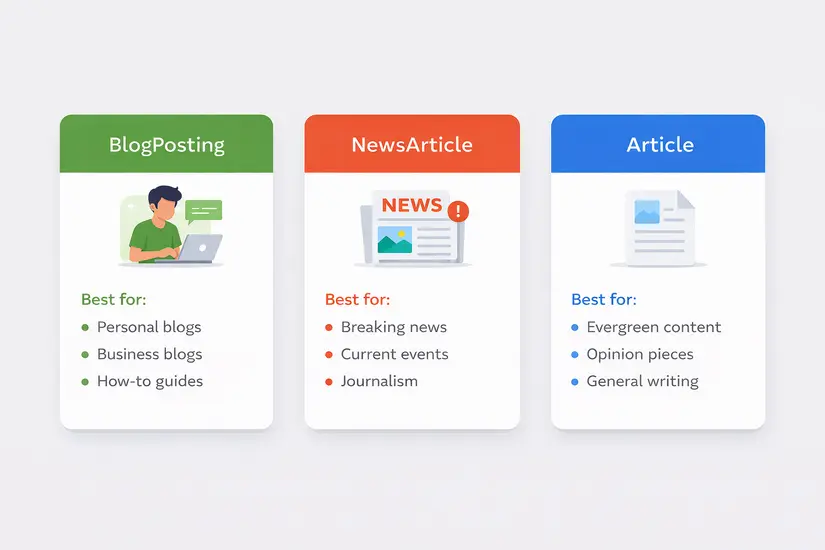
The schema.org article vocabulary defines several content types. Choosing the wrong one is one of the most common structured data markup mistakes — and it directly affects whether Google shows rich snippets for articles from your page.
| Content Type | Schema.org Article Type | When to Use It |
|---|---|---|
| Personal / business blog post | BlogPosting | Conversational, educational, or opinion content — most blogs |
| How-to guide, evergreen article | Article | General informational content not clearly fitting BlogPosting |
| Breaking news, event coverage | NewsArticle | Time-sensitive journalistic content only |
| Medical or research paper | MedicalScholarlyArticle | Academic or clinical content requiring high authority signals |
| In-depth editorial analysis | AnalysisNewsArticle | Investigative journalism or long-form news commentary |
BlogPosting — The Best Choice for Most Blogs
For the majority of bloggers, BlogPosting is the correct schema.org article type. It supports author credits, publish date, comment count, and publisher details — all properties that Google reads when deciding whether to show rich snippets for articles. It signals to Google that your content is informal, educational, or community-driven.
Article — The General-Purpose Fallback
Use Article when your content is evergreen and educational but does not clearly fit BlogPosting. It is more flexible but gives Google less specific context about your content format. It will still qualify your page for structured data markup validation and rich snippet eligibility.
NewsArticle — Only for Time-Sensitive Journalism
Apply NewsArticle exclusively to breaking news, event coverage, or current affairs reporting. Using this schema.org article type on evergreen blog content confuses Google’s freshness algorithms and can suppress rich snippets for articles from appearing. If your post will not lose relevance within 30 days, do not use NewsArticle.
- Key Rule: When in doubt between Article and BlogPosting: if your content has a named author and an educational or conversational tone, always choose BlogPosting. It is the most precise structured data markup signal for standard blog content and the most reliable path to earning rich snippets for articles.
5 Direct Benefits of Earning Rich Snippets for Articles
| Benefit | SEO Impact |
|---|---|
| Higher click-through rate in Google Search | Rich snippets for articles consistently outperform plain listings on CTR — often by 20–30% |
| Stronger E-E-A-T signals | Author name, publisher, and dates in article schema markup reinforce Expertise, Authority, Trust |
| AI answer engine citation eligibility | Structured data markup makes posts citable by Google AI Overview, Perplexity, and Gemini |
| Voice search readiness | Schema markup provides structured, extractable answers for voice and AI assistant queries |
| Content freshness control | dateModified in structured data markup actively signals recency to ranking algorithms |
- Higher CTR Without a Rankings Change:
Rich snippets for articles create visual separation between your result and ten identical plain blue links on the same SERP. The featured image alone draws the eye — and research shows users are significantly more likely to click a result that shows them who wrote it and when. This CTR lift feeds back into Google’s relevance signals, making article schema markup one of the few technical SEO actions with both direct and indirect ranking benefits.
- E-E-A-T Signal Reinforcement:
The author, publisher, and datePublished fields in article schema markup are direct E-E-A-T inputs — they tell Google who is responsible for the content and which organisation stands behind it. Schema markup is one of the few technical SEO actions that simultaneously improves machine readability and human trust signals, both of which Google’s quality raters assess.
- AI Answer Engine Citation Eligibility:
The author, publisher, and datePublished fields in article schema markup are direct E-E-A-T inputs — they tell Google who is responsible for the content and which organisation stands behind it. Schema markup is one of the few technical SEO actions that simultaneously improves machine readability and human trust signals, both of which Google’s quality raters assess.
- Voice Search Readiness:
The author, publisher, and datePublished fields in article schema markup are direct E-E-A-T inputs — they tell Google who is responsible for the content and which organisation stands behind it. Schema markup is one of the few technical SEO actions that simultaneously improves machine readability and human trust signals, both of which Google’s quality raters assess.
- Freshness Signal Control:
Every time you update a post and change the dateModified value in your structured data markup, you send an explicit freshness signal to Google. This is one of the most underused optimisation levers available — particularly for older posts being refreshed to maintain or recover rankings.
Article Schema Markup JSON-LD Template — Complete Structured Data Markup Code
Google recommends JSON-LD as the preferred format for all structured data markup. Paste the following BlogPosting schema.org article template inside your page’s <head> section. Every field that enables rich snippets for articles is included and annotated:

Property-by-property breakdown for rich snippets for articles eligibility:
- @type — Your schema.org article type; use BlogPosting for standard blogs
- headline — Must match your H1 exactly; mismatches cause Google to discard the entire schema markup block
- author + url — The most critical E-E-A-T field; links to your author page for credibility verification
- publisher + logo — Required by Google for rich snippets for articles; logo must be a valid image URL
- datePublished / dateModified — Always ISO 8601 (YYYY-MM-DD); update dateModified on every post revision
- image — Required for visual rich snippets for articles; minimum 1200x630px recommended
- mainEntityOfPage — Canonical URL; prevents structured data markup from appearing on duplicate pages
How to Implement Article Schema Markup and Earn Rich Snippets for Articles

Step 1: Choose Your Schema.org Article Type
Refer to the comparison table in Section 2. For most business blogs: BlogPosting. For evergreen how-to guides without a clear author tone: Article. Only use NewsArticle for time-sensitive journalism. The right schema.org article type is the foundation — wrong type means no rich snippets for articles regardless of how correctly you write the rest of the structured data markup.
Step 2: Generate Your Structured Data Markup
Options available to you:
- Write manually using the JSON-LD template above — most control, most accurate
- Google Structured Data Markup Helper — highlights content on your page and auto-generates code
- Merkle Schema Markup Generator — clean interface, no login, fast output
- Rank Math / Yoast SEO (WordPress) — auto-generates article schema markup per post; always validate the output
Step 3: Add the Code to Your Page
Paste the full <script type=”application/ld+json”> block inside the <head> section of your page. Both <head> and just before </body> are accepted by Google — <head> is the industry standard. For WordPress with Rank Math or Yoast: Post Editor > SEO Settings > Schema tab > set type to Blog Post.
Step 4: Validate Before Publishing
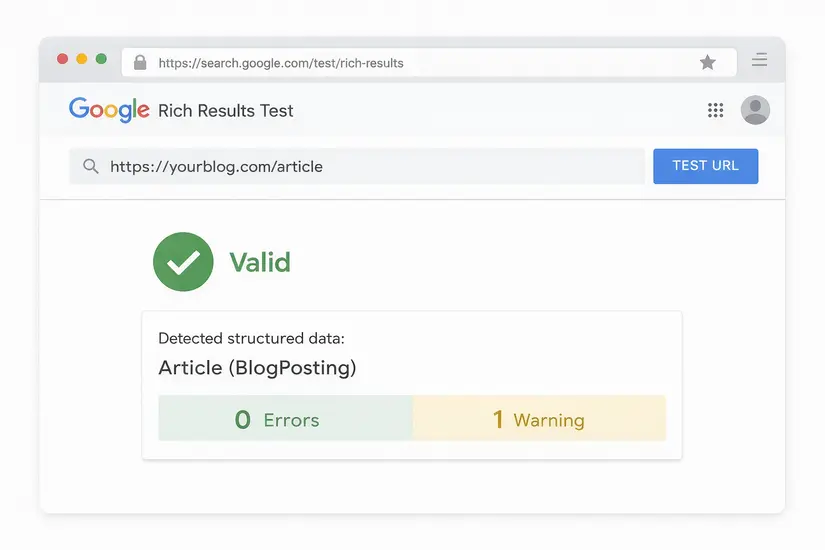
This step is non-negotiable. Unvalidated structured data markup that contains errors will not generate rich snippets for articles — even if every property is present. Use both tools:
- Google Rich Results Test (search.google.com/test/rich-results) — directly confirms rich snippets for articles eligibility
- Schema Markup Validator (validator.schema.org) — flags property errors and missing required fields
The two errors that most commonly kill rich snippet eligibility: missing image property and a headline that does not exactly match the H1. Fix all red errors before publishing.
Step 5: Monitor in Google Search Console
After publishing: Search Console > Enhancements section. Google reports structured data markup coverage and alerts you to errors as they appear. Check monthly and re-validate after every theme update or platform migration — both can silently break article schema markup and suppress rich snippets for articles.
6 Mistakes That Prevent Rich Snippets for Articles From Appearing
- ORIGINAL INSIGHT: From auditing client sites and reviewing Search Console data across TechMarg projects: the most damaging error is not missing schema entirely — it is structured data markup that contradicts the page content. A headline mismatch between your JSON-LD and your H1 causes Google to silently discard the entire schema markup block — no error shown, no rich snippets for articles earned.

- Mistake 1: Wrong Schema.org Article Type
Fix: Never use NewsArticle on evergreen content. It confuses Google’s freshness algorithms and misrepresents your content type. This alone can permanently suppress rich snippets for articles on a page — even after correcting the structured data markup later.
- Mistake 2: Missing Image Property in Article Schema Markup
Fix: Always include a featured image URL of at least 1200x630px. Google requires the image property for visual rich snippets for articles. Posts without a valid image URL in their structured data markup are ineligible for the thumbnail display — regardless of every other property being correct.
- Mistake 3: Headline in Schema Markup Does Not Match Your H1
Fix: Treat the headline field in your article schema markup as identical to your H1. Even minor wording differences cause Google to silently discard the structured data markup block. No error shows in validation tools — the markup simply stops generating rich snippets for articles.
- Mistake 4: Not Updating dateModified in Structured Data Markup
Fix: Every time you revise a post — even a minor edit — update the dateModified value. This is an active freshness signal that Google’s ranking systems and AI answer engines monitor. It is also one of the easiest wins for older posts being refreshed to recover lost rich snippet eligibility.
- Mistake 5: Adding Article Schema Markup to Non-Article Pages
Fix: Never add BlogPosting schema markup to homepages, category pages, product listings, or contact pages. Structured data markup must match the actual content type. Mismatched schema on non-article pages can trigger quality review flags from Google and suppress rich snippets for articles site-wide.
- Mistake 6: Skipping Validation of Structured Data Markup
Fix: Always run the Rich Results Test before and after publishing — and after every theme update. Five minutes of validation can prevent weeks of lost rich snippets for articles. Set a quarterly reminder to re-validate your top 10 posts even if no edits were made — hosting changes and plugin updates can silently break article schema markup.
FAQ: Rich Snippets for Articles and Article Schema Markup
Not directly. Google has confirmed that structured data markup is not a direct ranking factor. However, rich snippets for articles increase click-through rate — and higher CTR is a relevance signal that influences how Google evaluates your content's authority over time. Article schema markup is therefore an indirect but measurable ranking lever.
Typically two to six weeks after Googlebot recrawls your page. Accelerate this by submitting your URL for recrawling via the URL Inspection tool in Google Search Console. Rich snippet eligibility also depends on overall domain authority — newer sites with correct article schema markup may wait longer than established domains.
The schema.org article vocabulary defines: BlogPosting (informal, educational, or opinion content — correct for most blogs), Article (general evergreen content), and NewsArticle (time-sensitive journalism only). Using the wrong type misrepresents your content to Google and can prevent rich snippets for articles from appearing.
Yoast SEO and Rank Math auto-generate basic article schema markup, but they frequently miss: dateModified updates on post revisions, correct schema.org article type selection, and complete publisher logo data. Always validate plugin-generated structured data markup in the Rich Results Test to confirm it qualifies your page for rich snippets for articles.
Yes. Google supports multiple JSON-LD blocks per page. An effective combination for blog posts: BlogPosting (primary article schema markup) + FAQPage (if your post includes FAQ content) + BreadcrumbList (for navigational context). Keep each structured data markup type in its own separate <script> block for cleaner validation results.
Conclusion: How to Earn Rich Snippets for Articles Starting Today
Rich snippets for articles are one of the most actionable and underused visibility wins available to bloggers. They cost nothing to implement, take under 30 minutes to set up, and can meaningfully lift click-through rates without requiring any change in ranking position.
Article schema markup and the schema.org article vocabulary are the technical foundation behind every rich snippet for articles you see in Google Search. Structured data markup is also the primary signal that AI answer engines — Google AI Overview, Perplexity, Gemini — use when selecting which blogs to cite. Implementing it today is both an immediate CTR opportunity and a long-term content credibility investment.
- Action Plan: Implement article schema markup on your top 10 posts first — those pages have the most to gain from rich snippets for articles. Then make structured data markup a non-negotiable step in your publishing checklist for every new post going forward.
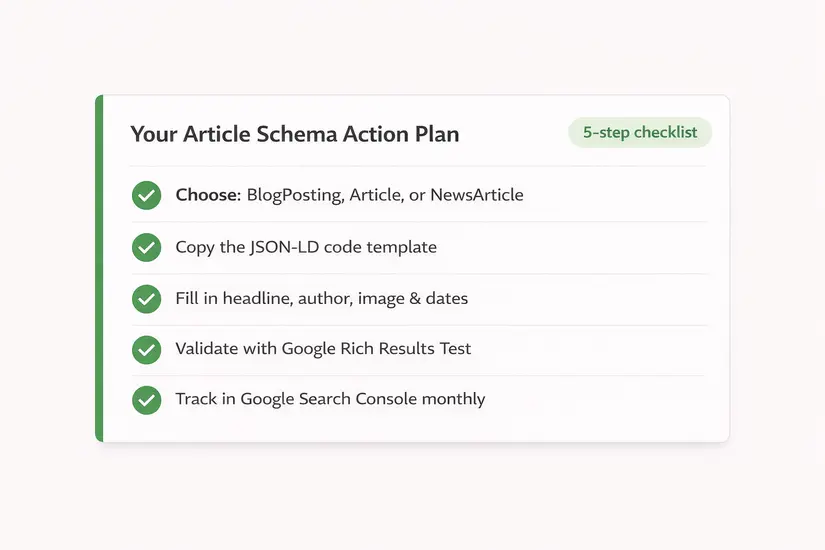
Your 6-step checklist to earn rich snippets for articles:
- Choose your schema.org article type: BlogPosting (most blogs), Article, or NewsArticle
- Copy the JSON-LD structured data markup template from Section 4 and fill in your values
- Paste the script block inside your page’s <head> section
- Validate using Google Rich Results Test — fix all red errors before publishing
- Monitor the Enhancements section in Google Search Console monthly
- Update dateModified in your article schema markup every time you revise a post