
FAQ Schema Markup: Complete Implementation Guide (2026)
What Is FAQ Schema Markup and Why Does It Matter for SEO?
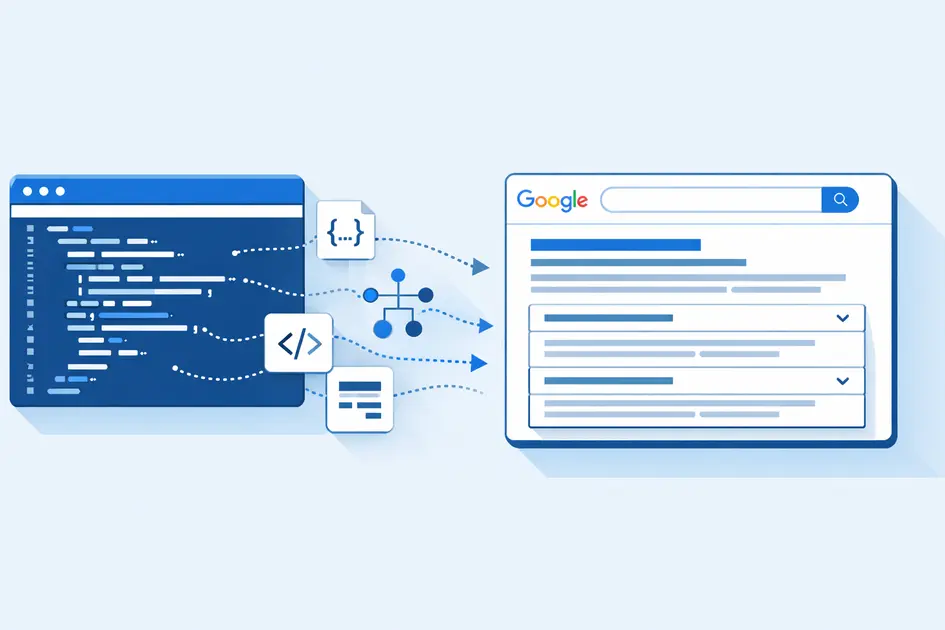
If you have ever wondered why some websites show expandable questions directly under their search result, the answer is FAQ schema markup. It is one of the most powerful yet underutilized tools in an SEO specialist’s toolkit — and in 2026, with AI Overviews reshaping how Google displays content, understanding it is more critical than ever.
FAQ schema markup is a type of structured data you add to your web page’s HTML code. It tells search engines, in a machine-readable format, that your page contains a list of frequently asked questions and their corresponding answers. Rather than leaving Google to guess what your Q&A content means, you explicitly communicate it using a standardized vocabulary defined by Schema.org.
FAQ schema markup is one component of a comprehensive structured data strategy. When properly implemented, it creates an explicit question-answer entity that search engines can confidently read and categorize.
In simple terms: schema markup is a translator between your content and search engines. It removes all ambiguity.
What Is Schema Markup? (The Foundation You Must Understand)
Before we dive into FAQ-specific implementation, let us quickly cover what schema markup is at its core.
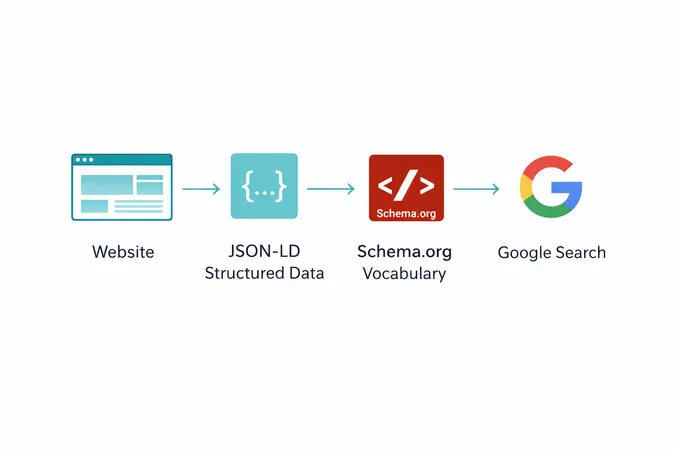
Schema markup is a snippet of code added to a webpage that helps search engines find organic on-page content. It is written in three language structures: JSON-LD (Google’s preferred format since 2015), Microdata, and RDFa.
The Schema.org vocabulary was created collaboratively by Google, Bing, Yahoo, and Yandex in 2011 as a standardized format that allows search engines to process web page information with greater accuracy, transforming unstructured content into machine-readable data.
For FAQ schema markup specifically, you are using the FAQ Page type from Schema.org. This is a subtype of WebPage and it contains nested Question and Answer entities.
For FAQ schema markup specifically, you are using the FAQ Page type on Schema.org. This is a subtype of WebPage and it contains nested Question and Answer entities.
The three formats explained:
- JSON-LD — Placed in a <script> tag, completely separate from your HTML content. Google recommends this. Easiest to implement and maintain.
- Microdata — Embedded directly inside your HTML tags. Works but harder to manage.
- RDFa — Similar to Microdata, rarely used in modern SEO workflows.
Always use JSON-LD. It keeps your structured data clean, portable, and easy to update.
FAQ Page vs QA Page: Know the Difference
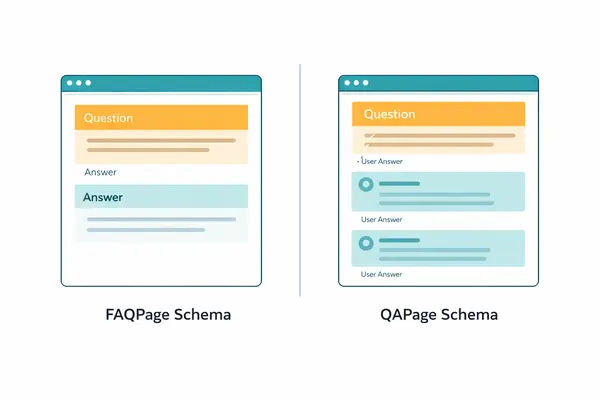
This is one of the most common mistakes beginners make — confusing FAQPage with QAPage schema. They serve completely different purposes.
FAQ Page is for FAQ pages written by the site itself that do not let users provide alternative answers. QA Page is used when users can submit answers to questions and vote for the best one, such as on forum pages or community support pages.
Use FAQ Page when:
- You write both the question AND the answer
- Content lives on a dedicated FAQ page or a FAQ section within a blog post or product page
- There is only one authoritative answer per question
Use QA Page when:
- Community members can submit multiple answers
- Users vote on the best response
If you add FAQPage markup to a community forum, or use QAPage on an editorial FAQ, Google may ignore your markup entirely or apply a manual action. Use the right type for the right content.
Does FAQ Schema Markup Still Work in 2026?
Here is the honest truth that most guides skip: Google restricted FAQ rich results in August 2023, limiting the accordion dropdown results primarily to well-known government and health websites. For most commercial sites, FAQPage markup will not generate the expandable dropdown in search results.
But — and this is crucial — that does not mean FAQ schema markup is useless.
For informational blog posts, product pages, and non-health content, FAQPage rich results still appear regularly in 2026. The key is that the page must be genuinely informational, not promotional.
Moreover, FAQPage schema still declares explicit question-and-answer entities in machine-readable code, and AI Overviews and answer engines parse that structure. Google still reads it for entity understanding.
Today, that structured content can also be pulled into generative AI responses like Google’s AI Overviews, giving you another opportunity to show up even if you are not ranking number one.
Bottom line: Even if you do not get the visual rich result accordion, your FAQ schema markup feeds Google’s knowledge graph, improves entity understanding, and increases your chances of being cited in AI-generated answers. Do not skip it.
How to Write the FAQ Schema Markup Code (JSON-LD)
Here is the production-ready JSON-LD code for FAQ schema markup that you can copy and adapt immediately:
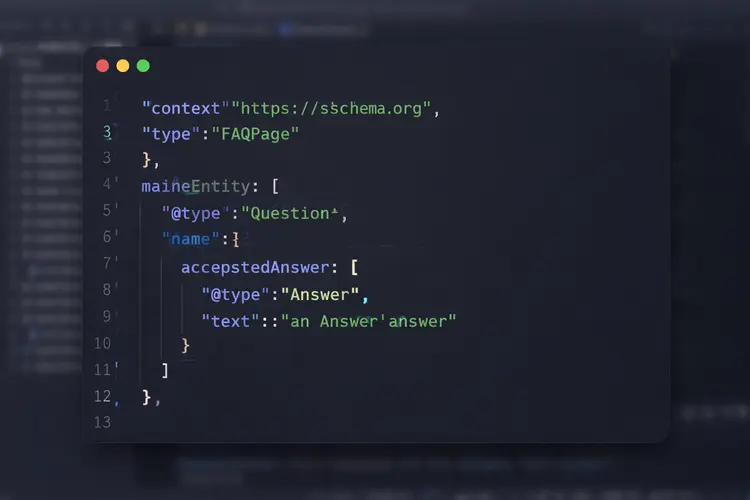
Key properties explained:
- @context — Always
https://schema.org @type: FAQPage— Declares the page typemainEntity— Array of Question objectsname— The exact question text visible on the pageacceptedAnswer→text— The complete answer visible on the page
There is no hard limit on FAQ items in your schema, but Google may display up to 10 questions in rich results. Include only genuinely relevant questions that provide value to users.
Google's FAQ Schema Markup Rules You Must Follow
Getting the code right is only half the job. Google has strict content guidelines for FAQ schema for SEO. Violating them can result in your markup being completely ignored — or worse, a manual action.
FAQ content must be written by the site itself, not user-generated. According to Google’s official FAQ schema markup guidelines , each question must include the complete question text and one authoritative answer.
Required rules:
Getting the code right is only half the job. Google has strict content guidelines for FAQ schema for SEO. Violating them can result in your markup being completely ignored — or worse, a manual action.
- FAQ content must be written by the site itself, not user-generated. Each question must include the complete question text and one authoritative answer.
- Visible content only. Google requires FAQ content to be visible on the page. Implementing FAQ schema for content hidden in accordions that require JavaScript to display, or content only visible on user interaction, may violate guidelines.
- No duplicate schema. FAQ schema must match the Q&A content of the specific page it is on. Copying identical FAQ schema across multiple pages violates Google’s structured data guidelines. Each page needs its own unique questions relevant to that page’s topic.
- No promotional content. Google explicitly warns against using FAQ markup for advertising. Even without schema, avoid turning answers into sales pitches. Focus on user value first.
- One answer per question. Each question in your FAQPage schema should have exactly one definitive, authoritative answer.
How to Add FAQ Schema Markup: Step-by-Step
Follow these deployment steps: add the required properties, adhere to Google’s guidelines, validate your code, test with the Rich Results Test, deploy, and submit your sitemap.
Step 1: Write your FAQ content on the page first Before touching any code, create your questions and answers as visible, readable HTML content on the page. Schema never replaces content — it annotates it.
Step 2: Generate the JSON-LD code Use the template above or a free FAQ schema markup generator tool. There are several reliable ones online that let you fill in questions and answers and export ready-to-paste JSON-LD.
Step 3: Add the script tag to your page Paste the <script type="application/ld+json"> block in the <head> section or just before the closing </body> tag of your page’s HTML. In WordPress, plugins like Yoast SEO or Rank Math handle this automatically.
Step 4: Validate your markup Run your page through two tools:
- Google Rich Results Test (search.google.com/test/rich-results) — checks for rich result eligibility
- Schema.org Validator (validator.schema.org) — catches vocabulary and structural errors
- Run your page through the Google Rich Results Test and the Schema.org Validator — both must show zero errors before you publish.
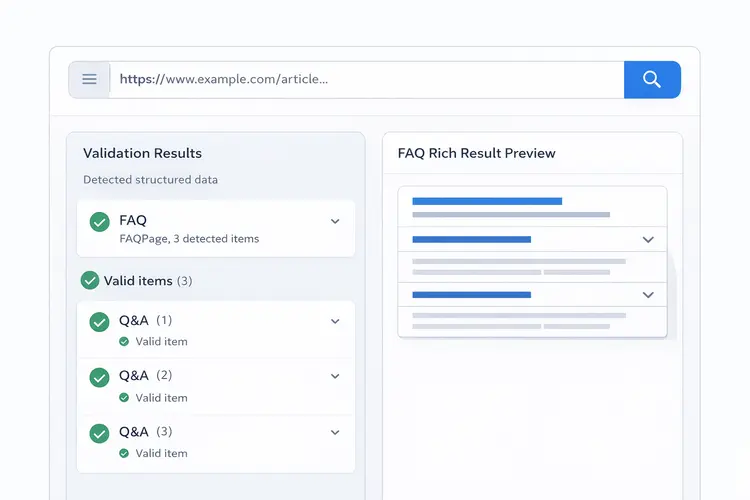
Errors prevent rich result eligibility entirely and must be fixed. Warnings suggest improvements but do not block rich results — address them when possible to maximize quality.
Step 5: Monitor in Google Search Console After deployment, check the Enhancements section in Google Search Console. Filter by search appearance and look for FAQ rich results. If you see errors, fix them immediately.
After deployment, check the Google Search Console Enhancements report and filter by FAQ to monitor rich result status.
FAQ Schema Markup for WordPress and Other CMS Platforms
You do not need to edit raw HTML to implement FAQ schema markup. Most CMS platforms support it natively or through plugins:
WordPress:
- Rank Math SEO — Built-in FAQ block with automatic schema generation
- Yoast SEO — FAQ block in the Gutenberg editor auto-generates JSON-LD
- All In One SEO — Similar FAQ schema support
Shopify:
- Use schema apps from the Shopify App Store, or add JSON-LD through the theme’s
layout/theme.liquidfile
Next.js / React: Inject the JSON-LD via a <script> tag inside your component’s <Head> using next/head. Using JSON-LD means it is separate from your HTML content, making it easier to maintain and less prone to breaking when you update your site design.
FAQ Schema Markup and AI Overviews: The 2026 Angle

This is where FAQ schema markup gains a completely new dimension of importance.
A retrieval-augmented generation system that pulls content from your page gets a cleaner signal from an explicit question-answer pair in JSON-LD than from the same information scattered across paragraphs.
Craft responses that are concise, factual, and written in natural language. AI models perform best with content that reflects genuine expertise — direct, clear, and rich with relevant entities, facts, and relationships that reinforce topical authority.
In practice, this means: even if your FAQ schema markup does not produce a visual accordion in Google Search, it is still actively helping Google’s large language models understand your content for AI Overview citations. As AI-driven search continues to grow through 2026, this signal becomes increasingly valuable.
Common Mistakes to Avoid
- Adding FAQ schema to pages where content is not visible — Always ensure answers are rendered in HTML, not locked behind JavaScript interactions
- Using duplicate FAQ schemas across multiple pages — Each page needs unique, page-relevant questions
- Promotional answers — “Buy our product today!” in an answer field will get your markup flagged
- Wrong schema type — Using FAQPage on a community forum instead of QAPage
- Not updating schema when content changes — Mismatched schema and on-page content is a guideline violation
Final Takeaway
FAQ schema markup remains one of the most accessible and high-impact structured data implementations available to any website in 2026. While Google’s 2023 changes reduced the visual rich result for most commercial sites, the underlying SEO value — better entity understanding, AI Overview eligibility, and improved content clarity — has only grown stronger.
And remember — structured data performs best on a technically sound website. If you have not already optimized your site’s Core Web Vitals, that should be your next priority.
FAQ schema markup is structured data added to a webpage using JSON-LD code that tells search engines which content on the page represents questions and their answers. It uses the FAQPage type from Schema.org vocabulary and helps Google display your Q&A content as rich results in search, while also improving your chances of appearing in AI Overview citations.
Yes, but with limitations. Google now restricts FAQ rich result dropdowns primarily to government and health-focused websites. However, for all websites, FAQ schema can still be pulled into generative AI responses like Google's AI Overviews, giving you another opportunity to show up even if you are not ranking number one.
Keep in mind that schema markup works best when your page already passes Google's Core Web Vitals — a slow or unstable page reduces the impact of even perfect structured data.
FAQ schema is not a ranking signal — it will not move you from position 10 to position 5. It is an eligibility signal for FAQ rich results and an indirect value driver through explicit entity declarations and structured Q&A format that improves how search engines and AI systems parse your content.
FAQPage is for pages where the site owner provides definitive answers to common questions — you control both the question and the answer. QAPage is for community-driven Q&A where users submit questions and multiple people offer answers, like Stack Overflow or forum threads. The property difference is concrete: FAQ Page uses accepted Answer (one definitive answer), while QA Page uses suggested Answer for multiple possible answers.
Write a JSON-LD script block with @type: "FAQPage" and place it in your page's <head> or <body> — both work. If you are on WordPress, Rank Math's FAQ block generates this automatically from your input. Always validate the output using Google's Rich Results Test before publishing.
According to Google Search Central, pages with valid FAQ markup can display up to 10 question-answer pairs in search results, though Google determines the actual number displayed based on various factors. As a practical rule, include between 4–8 genuinely relevant questions — quality and relevance always outweigh quantity.
FAQ schema can be added to pretty much any page that has FAQ-type questions and answers — including blog posts, service pages, product support pages, and dedicated FAQ pages. The only requirement is that each question must have a single, site-authored answer and the content must be visible to users on the page.
Use two tools: Google's Rich Results Test (search.google.com/test/rich-results) checks whether your page is eligible for rich results and flags critical errors, and the Schema.org Validator (validator.schema.org) checks for structural and vocabulary errors. Errors prevent rich result eligibility entirely and must be fixed. Warnings suggest improvements but do not block rich results — address them when possible to maximize quality.
The most common mistakes include: using FAQ Page on community forums (use QA Page instead), adding identical FAQ schema across multiple pages which Google treats as a manipulation attempt, hiding answer content behind JavaScript that does not load in the initial HTML, and using answers for promotional copy rather than genuine user information.
Yes — this is one of the strongest reasons to use it in 2026. This format helps large language models map questions to authoritative responses and improves your chances of being cited in AI-driven search results. Well-structured Q&A content remains key to helping AI systems retrieve your brand's answers in response to user queries, even when traditional rich snippets are not shown.